
This month, we are launching exciting product updates in Lemax. Learn about the details below (available from November 12th, 2026).
API updated: Changes in photo attributes and destination photos
What’s new
The API now returns more information about photos. Photos come with their photo attributes (the attribute groups and attributes you create on a photo, for example an expiry date or picture location), alongside the Photo details they already had (Title, Alternate text, Caption, Description and Geo location). Product and package descriptions can now also return photos of their destinations, regions and countries. Photo details that are not translated into the requested language now come back in the default language instead of empty.
All changes are additions. Existing integrations keep working without any change; new data on Search and the new destination photos are returned only when requested.
This update is automatically available to you once the release is launched. Please note that the usage of this update could depend on system setups (which modules/products you use) and user roles.
Problem being solved
Photo attributes were not returned by the API, even when photos were requested. Websites built on the API could not tell which photo to use or whether a photo had expired, so photo selection relied on the free-text Description field.
Product and package descriptions did not return photos of destinations, regions and countries. For packages, only the main destination was covered.
When Photo details were missing in the requested language, product, unit and package photos came back with an empty Title, Alternate text, Caption, Description and Geo location.
Benefit for the users
- Websites and portals can select the right photo automatically by its attributes and avoid showing expired photos.
- All photos for a product or package, including destination, region and country photos, can be received in one call.
- Photos always have their Photo details (e.g. title and description), even when a translation is missing.
- Search stays fast: the extra photo data is returned there only on request.
How it works
Each photo in the response has two kinds of data:
- Photo details: the fixed fields of every photo
- Photo attributes: the attribute groups and attributes created on the photo
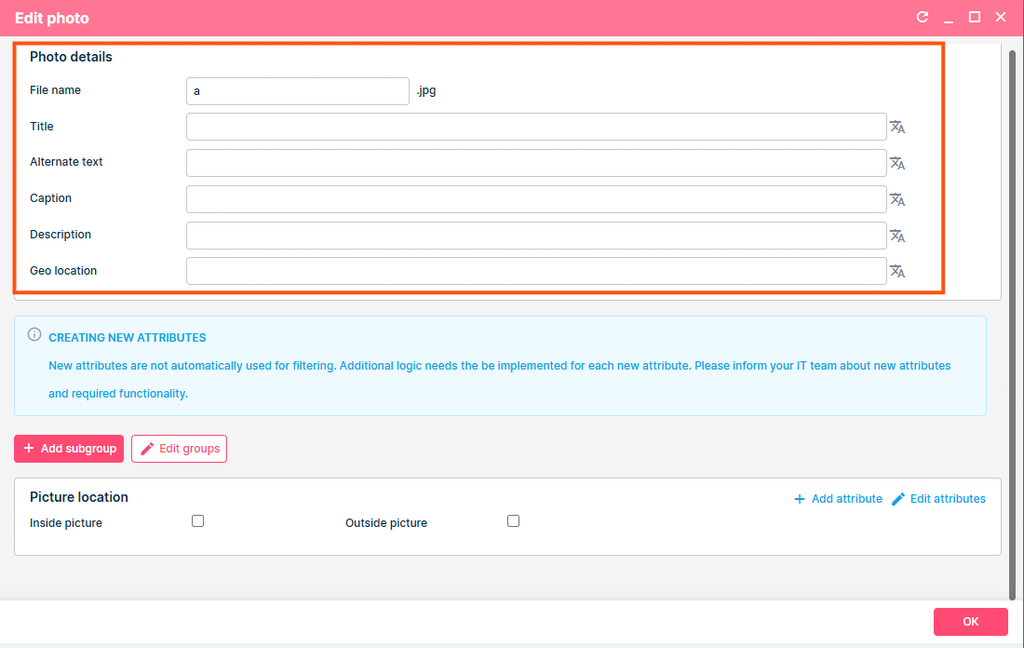
1. Photo attributes in product and package descriptions
Endpoints: POST /Accommodation/Description (SOAP: GetDetailedDescription) and POST /Tours/Description (SOAP: GetPackageDetailedDescription)
What changed: product, unit, package and subgroup photos now include their attributes.
How to get it: always included, nothing needs to be sent.
2. Destination, region and country photos in descriptions
Endpoints: POST /Accommodation/Description and POST /Tours/Description
What changed: a new option returns photos of destinations, regions and countries, with their Photo details and photo attributes.
/Accommodation/Description: photos inPhotoListonDestination,RegionandCountry./Tours/Description: photos inPhotoListon every entry ofDestinationList,RegionListandCountryList, not only the main destination.
How to get it: send ResponseDetail 7 (GetDestinationPhotos) in OutParameterList. Without it, the response stays the same as before.
"OutParameterList": [ { "ResponseDetail": 7 } ]
On the Description endpoints, ResponseDetail must be sent as a number; the name is not accepted.
3. Photo attributes in search results
Endpoints: POST /Accommodation/Search (SOAP: GetSearchResults) and POST /Tours/Search (SOAP: GetPackageSearchResults)
What changed: photos can now include their attributes.
How to get it: only on request, so searches stay fast. Add to OutParameterList:
ObjectPhotosDetailedAttributes(16): attributes on product and package photosUnitPhotosDetailedAttributes(17): attributes on unit and subgroup photos
On Search, the options can be sent as a name or a number.
4. Photo attributes on destinations
Endpoint: POST /Location/GetDestinations (SOAP: GetDestinations)
What changed: destination photos now include their attributes.
How to get it: always included, nothing needs to be sent.
5. Photo details in other languages
Endpoints: POST /Accommodation/Description and POST /Tours/Description (and their SOAP equivalents)
What changed: when Photo details (Title, AlternateText, Caption, Description, GeoLocation) are not translated into the requested language (LanguageID), they now come back in the default language instead of empty. This applies to all photos in the response.
How to get it: applied automatically, also for existing integrations.
Attribute group and attribute names (GroupName, AttributeName) are not replaced with the default language. GroupID and AttributeID are always returned, so each attribute can still be identified.
