
This month, we are launching exciting product updates in Lemax. Learn about the details below (available from July 2nd, 2026).
Improvement of Passenger Management on PBOBF
What’s new
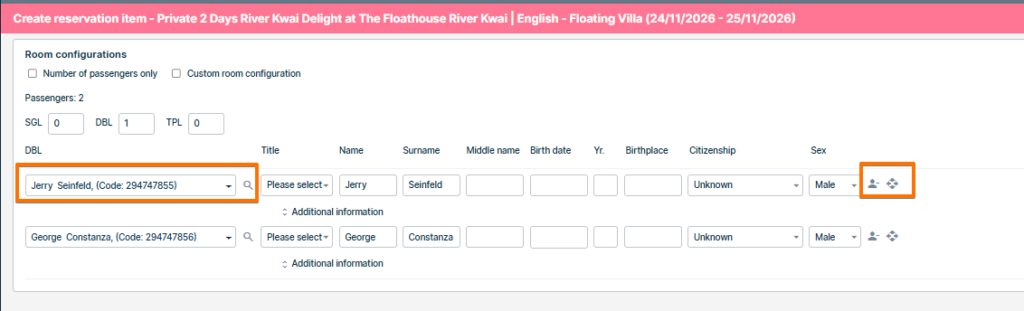
We’ve improved how the Packages Back-office Booking Form (PBOBF) handles passenger information. Reservation agents can now keep all already-entered passenger data when changing the room configuration, remove a single passenger from a row without affecting the rest of the list, quickly pick existing passengers from a dropdown and drag & drop passengers between rooms. The interrupting warning pop-up that used to appear before every configuration change has been removed.
This update is automatically available to you once the release is launched. Please note that the usage of this update could depend on system setups (which modules/products you use) and user roles.
Problem being solved
- When the room configuration was changed in PBOBF, all already-entered passenger data was wiped and replaced with empty rows.
- Agents had to re-enter passenger details from scratch, creating rework and a high risk of data-entry errors.
- A warning pop-up appeared before every configuration change that interrupted the workflow, but did not actually save the data.
- PBOBF lacked the flexible passenger management (single-row remove, dropdown reassignment) already available in the standard BOBF.
Benefit for the users
- No more lost work → passenger data is preserved automatically when the room configuration changes.
- Faster bookings → agents can adjust room splits or switch configuration modes without retyping.
- Fewer errors → pre-populated rows and the passenger dropdown reduce typos and duplicates.
- Smoother workflow → the interrupting warning pop-up is gone, so changes apply immediately.
- Consistent experience → Booking form for packages now behaves like the standard Booking form that agents are already familiar with.
- More flexibility → drag & drop lets agents reorganize passengers between rooms in one action.
How it works
Passenger data is preserved on room configuration change
- When the room configuration changes, already-entered passenger rows stay populated.
Remove a passenger from a single row
- Each passenger row now has a remove (×) icon. Clicking it clears the data for that row only.
Reassign a passenger via the dropdown
- Each row exposes a dropdown that lists existing passengers. Selecting one auto-populates the row fields.
No more warning pop-up on configuration change
- Because data is preserved automatically, the confirmation pop-up has been removed. Configuration changes apply immediately
Drag & drop passengers between rooms
- Each row exposes a drag handle so agents can move passengers between rooms. Capacity rules are respected, data is preserved on the move.
Passenger management on bookings
What’s new
This update improves how you manage passengers on reservations. It introduces a dedicated Edit passengers form for editing all passengers on a reservation in one place, lets you reuse existing passengers from multiple items when adding new items to a booking, shows the number of unique passengers directly on the reservation, and speeds up loading of the booking form and reservation screens.
This update is automatically available to you once the release is launched. Please note that the usage of this update could depend on system setups (which modules/products you use) and user roles.
Problem being solved
- Editing passenger data on reservations was slow and limited. The booking form (BOBF) could only handle a small number of passengers per item and was not a convenient place to edit passenger details.
- Adding a new item to a booking required re-entering passengers who already existed on the reservation.
- There was also no quick way to see how many distinct passengers a reservation covered, and several reservation screens loaded more data than needed, which slowed them down.
Benefit for the users
Faster and simpler passenger management, especially on large bookings. Passenger details can be edited in one place for the whole reservation, existing passengers can be reused when adding items, the number of unique passengers is visible at a glance, and the booking form and reservation screens load faster.
How it works
Edit passengers form
- A new Edit passengers form is available from the Passengers tab on a reservation. It shows all passengers on the reservation and lets you edit their details directly in the form.
- The form shows a unique passenger count. It supports only editing passenger data, without other actions like removing, replacing, or deleting a passenger.
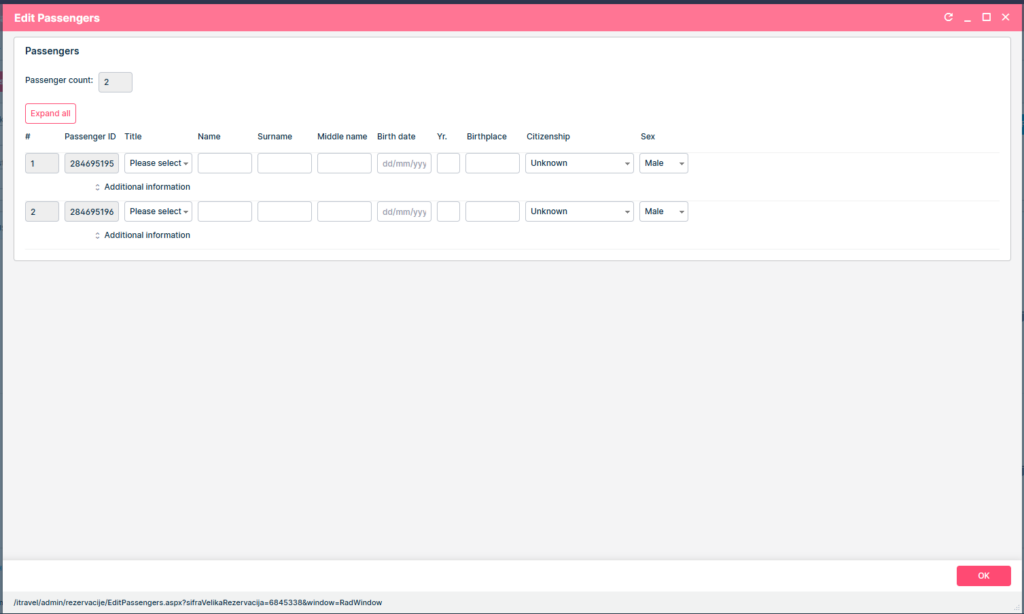
An “Expand all” / “Collapse all” button lets you open the Additional information section for all passengers at once. Passenger sequence numbers are now shown on the booking form and the Passengers tab.
Reuse passengers when adding new items
- You can now add a new item to a booking using the passengers from one or more existing items.
- Select the items, then choose “Add new item with passengers from selected items” under the Options menu on the Reservation.
- The system collects the passengers from the selected items and starts a search for the new item with the correct passenger count and adult/child configuration.
- It works for both simple and complex (grouped) products, and no duplicate passengers are created.
Unique passengers count on the reservation edit
- The items grid on the reservation edit screen now shows a “Unique” value in the footer row. It is the number of distinct passengers across all active items on the reservation.
- A passenger booked on several items is counted once, and cancelled items are not counted. This total always reflects the whole reservation, regardless of grid pagination.
Faster loading of the booking form and reservation screens
- Loading of the booking form (BOBF), the reservation edit screen and the reservation items grid has been optimized. Redundant data loads were removed and several queries were made more targeted, so these screens open faster, especially on large reservations.
