
This month, we are launching exciting product updates in Lemax. Learn about the details below (available from January 29th, 2026).
“Title” Field on Customer/Passenger
What’s new
A new system field “Title” (Mr., Mrs., Ms., Dr., etc.) has been introduced across the Lemax system for Customers, Passengers, Suppliers, and Travel Agents. This field improves personalization, ensures consistent data handling across the system and APIs (web flows), and enhances integration readiness with external systems such as GDS (Travelport).
The update covers:
- A new administrator tool, “Title for Customer/Passenger” for managing available titles, mandatory settings, and gender compatibility (handled by Lemax employees based on the custom client setup)
- Full UI integration of the Title field in the Back Office, Online Booking Form (OBF), and Back Office Booking Form (BOBF).
- API extensions for all SOAP and REST endpoints handling Customer and Passenger entities.
This update is automatically available to you once the release is launched.
Please contact support@lemax.net for additional information on advisory services on how this update could be set up for your instance, or if you have any additional inquiries.
Problem being solved
- Lack of a system-standard “Title” field required agencies to use custom fields inconsistently.
- Incomplete customer and passenger personalization data for documents, emails, and integrations.
Benefit for the users
- Consistent handling of personal data across Customer, Passenger, and Partner records.
- Improved personalization in documents, emails, and GDS communications.
How it works
Title Field in Back Office
The Title field is now visible on:
- Customer form (above the Name field, for Person type only).
- Supplier and Travel Agent forms when marked as Person.
- Passenger form (always visible on General tab).
- Reservation details, Travel Product Search, Transaction, and Payment Receipt forms.
- Grid filters (Customer grids now display “Name, Surname, Title”).
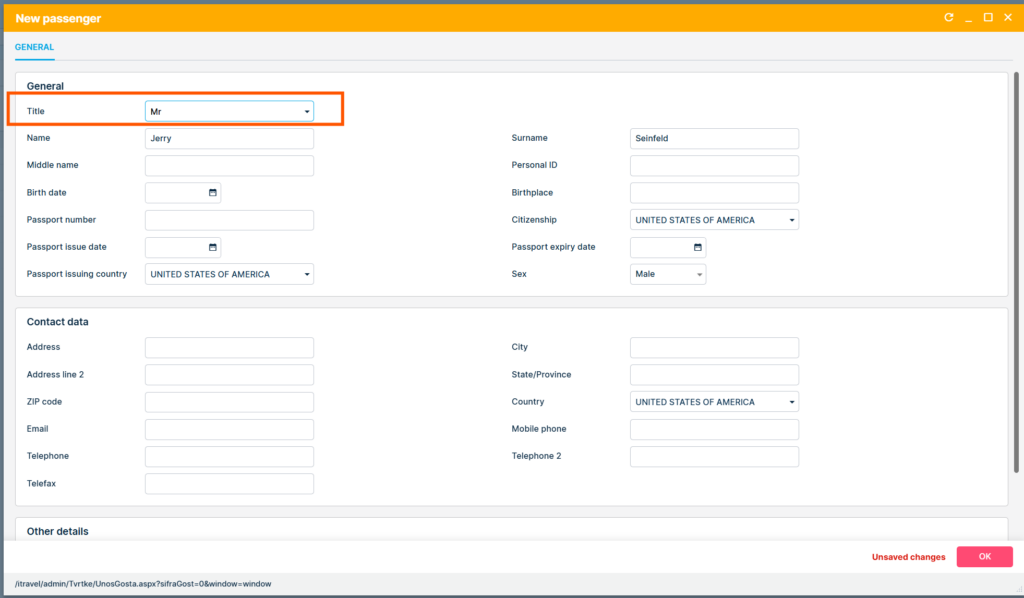
Data synchronization:
- When a Customer (type=Person) is created, a connected Passenger record is created automatically, including the Title.
- Editing the Title on Customer or Passenger updates both linked records.
Title Field on Booking Forms
Back Office Booking Form (BOBF)
- Added a Title field for each passenger in the Reservation item details.
- If Title is mandatory (custom client setup), validation prevents saving reservation item without it.
- For GDS flight bookings, Title becomes mandatory if configured in setup.
Online Booking Form (OBF)
- Title is available in both Passenger and Customer sections.
- Users can configure whether it is mandatory or optional.
- For optional Titles, users may add/remove the field in Booking Form Data settings.
- Behavior applies across both booking flows: back-office (shopping cart) and website bookings
API Enhancements
The “Title” field is now part of both SOAP and REST APIs for all Customer and Passenger-related endpoints:
GetCustomers,CustomerInsert,SaveCustomersGetPassengersOnReservation,PassengerUpdateInsertReservation,InsertReservationItemGetReservation,GetAllReservations
Validation Logic:
- Title must match one of the active values defined in the custom client setup.
- Title must be valid for the selected Gender.
- If invalid, API returns a clear validation error message.
- “Unknown” Title is automatically used when invalid or deactivated Titles are received.
- Enhanced logic infers gender from Title if Gender is missing (e.g., Gender=0 or null).
Backward compatibility:
- Existing integrations without Title remain functional (Title is set as optional by default).
- Clients using custom “Title” custom field can migrate the values to “Title“ system field in coordination with Lemax CS and CC teams.
Grids and Data Maintenance
- A new “Title” column has been added to:
- Partners grids (Customers, Suppliers, Travel Agents)
- Passengers grid
- Hidden by default; can be shown via “Edit Columns”.
- Enables filtering for “Unknown” Titles to identify and correct invalid entries.
