
This month, we are launching exciting product updates in Lemax. Learn about the details below (available from February 26th, 2026).
Enable Contract-Compliant Net Fare Search and Booking
What’s new
Flight search and booking through Galileo now fully supports contract-compliant Net and Private fare flows.
Users can explicitly control which fare types are searched and how passenger types are sent to the airline system. This ensures that airline contracts are correctly recognized during both search and booking.
As a result, Net Fare Entries are now reliably generated in Galileo:
- as standalone Net Fare bookings
- and in combination with OSI remarks, when required by the airline-agency contract
This stabilizes the entire Net Fare flow — from search, through pricing, to booking — by aligning Lemax behavior with airline contract requirements.
Please contact support@lemax.net for additional information for advisory services on how this update could be set up for your instance or if you have any additional inquiries.
Problem being solved
Net and Private fares were technically retrievable, but the search and booking inputs sent to Galileo did not consistently match airline contract expectations.
Because passenger type handling was not contract-aware:
- Net Fare searches often returned empty or limited results
- Bookings frequently failed
- or Net Fare Entries were not generated correctly in Galileo
In cases where contracts required specific passenger semantics (such as ITX) or OSI-based recognition, the system did not deterministically enforce the required behaviour.
This led to unstable Net Fare workflows and operational friction.
Benefit for the users
Flight searches and bookings for Net and Private fares are now contract-compliant by design.
The system:
- deterministically controls passenger code semantics per fare type
- separates fare-type searches into independent requests
- preserves the same logic during booking
- ensures correct Net Fare Entry generation in Galileo (with or without OSI, depending on contract)
For agencies working with airline contracts, this means predictable search results, stable booking behavior, and reliable contract recognition throughout the process.
How it works
You Choose Which Fare Types to Search
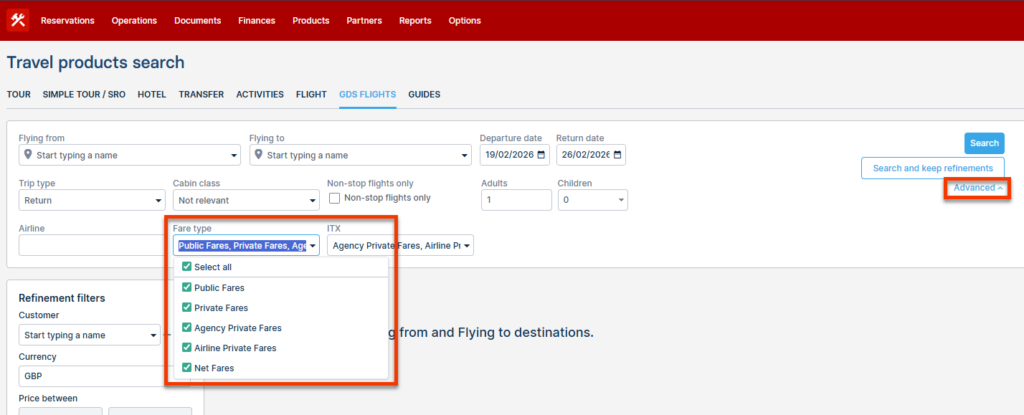
In Advanced Search, you can now select which fare types you want to include in your search.
Available options:
- Public
- Private
- Agency Private
- Airline Private
- Net
By default, all fare types are selected.
If you deselect a fare type, it will not be included in the search.
This allows you to:
- Focus only on Net fares when working with airline contracts
- Compare Public vs. Private results
- Exclude fare types that are not relevant to your agreement
ITX Option for Contract-Based Fares
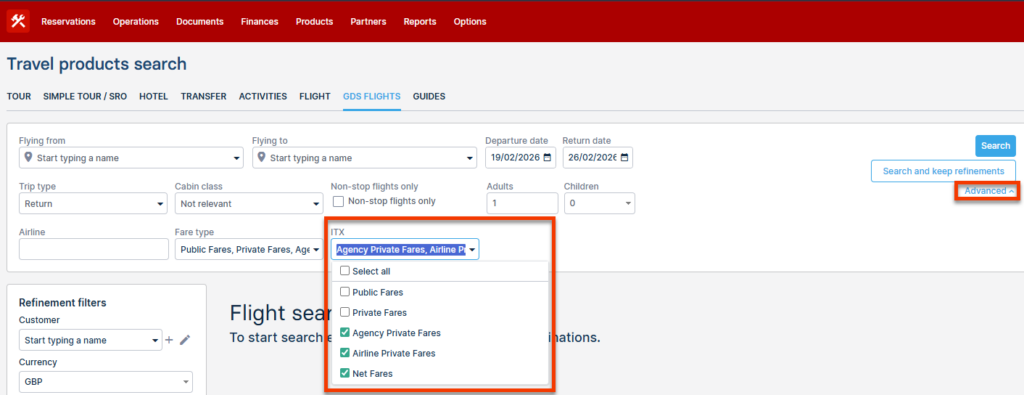
Some airline contracts require bookings to be made using ITX passenger handling.
When this applies, you can activate ITX for specific fare types directly within the Fare Type selection.
Important:
- ITX applies only to fare types that are selected in the Fare Type filter.
- It does not affect other fare types.
- It cannot work independently from Fare Type selection.
For example:
- You may search Net fares using ITX
- While Public fares remain standard ADT/CHD
This ensures that fare types requiring special contract handling are searched and booked correctly, without affecting other results.
