
This month, we are launching exciting product updates in Lemax. Learn about the details below (available from December 18th, 2025).
Pricing policy enhancement – date and margins in one PP
What’s new
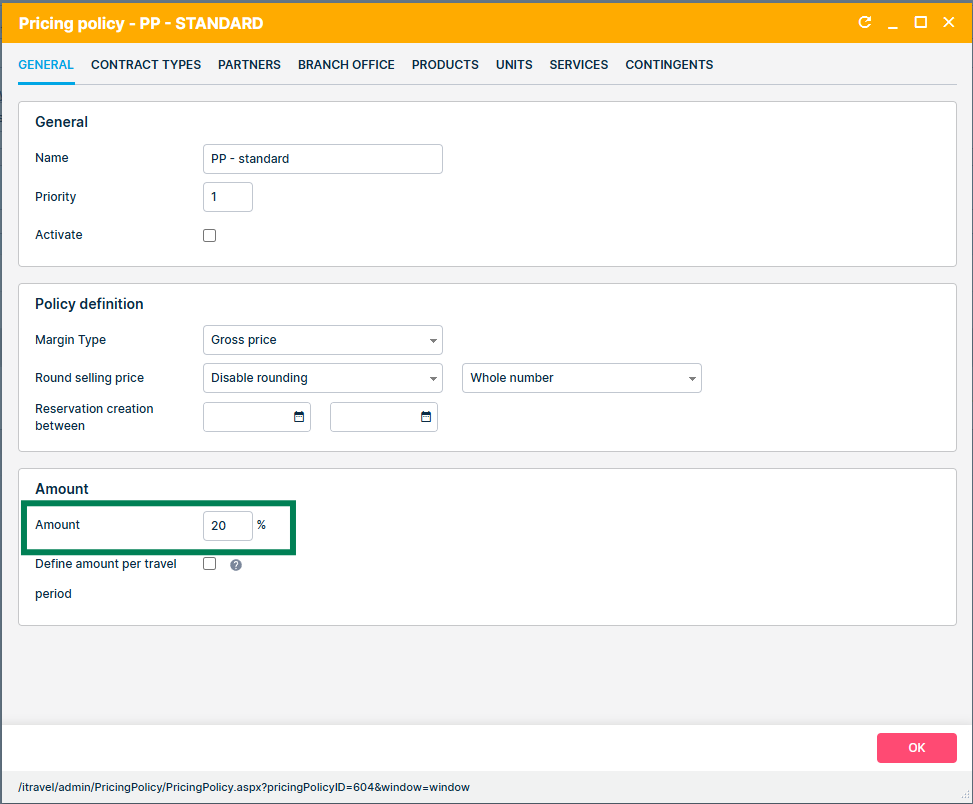
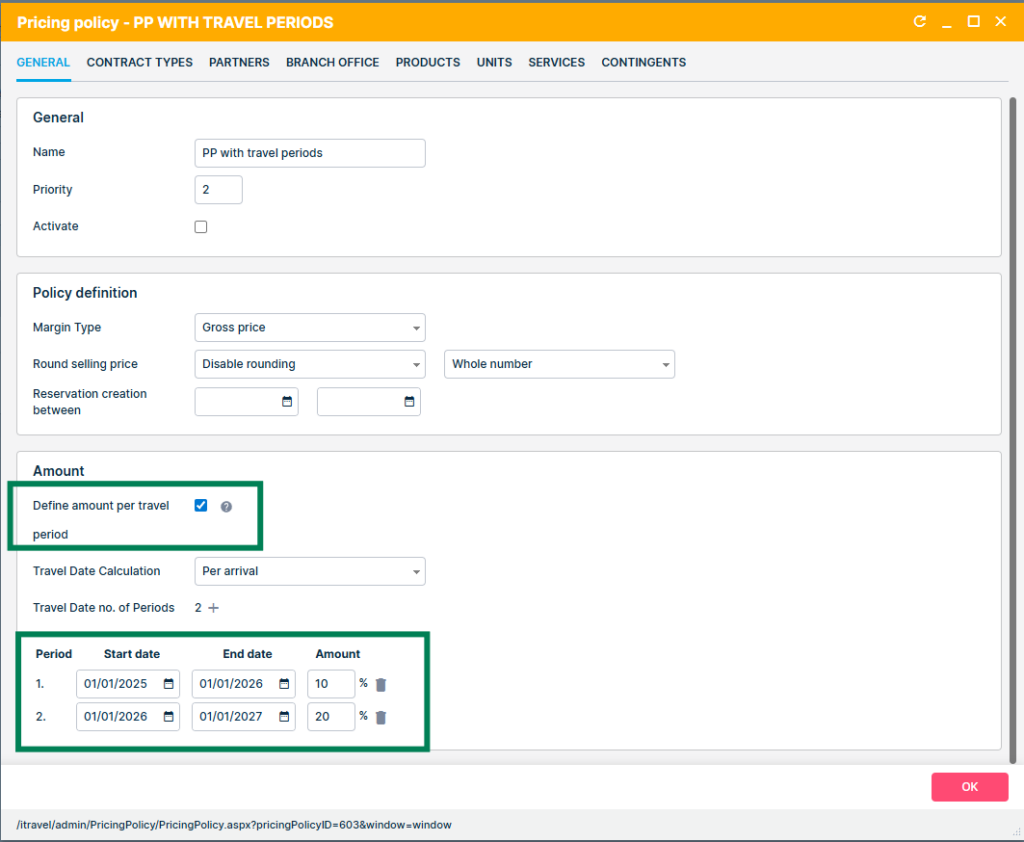
A redesigned pricing policy model now allows defining multiple travel periods, each with its own margin percentage, within a single pricing policy. If travel periods are not used, the system behaves as before, with slight UI changes.
All existing pricing policies with defined travel periods will be safely migrated, with no impact on the pricing policy behaviour and existing reservations. There are no changes in pricing calculation.
Standard pricing policy
Pricing policy with travel periods
This update is automatically available to you once the release is launched. Please note that the usage of this update could depend on system setups (which modules/products you use) and user roles.
Problem being solved
Previously, pricing policies supported only one margin percentage for all dates, forcing users to create many separate pricing policies to handle seasonal differences. This resulted in unnecessary duplication, complex maintenance, and slower updates when business rules changed.
Benefit for the users
Users can now configure all relevant seasonal or period-based margins in one place, significantly reducing the number of pricing policies needed. Maintaining and updating pricing becomes faster, clearer, and less prone to error. The enhanced UI provides full visibility of all travel periods and their margins in one place.
How it works
UI changes
The following UI changes have been made:
- Dates section is renamed to Amount
- The Amount field to define the margin percentage is moved from the Policy definition section to the new Amount section
- Reservation creation dates are moved to the Policy definition section
- A new functionality Define amount per travel period is added to the Amount section, disabled by default
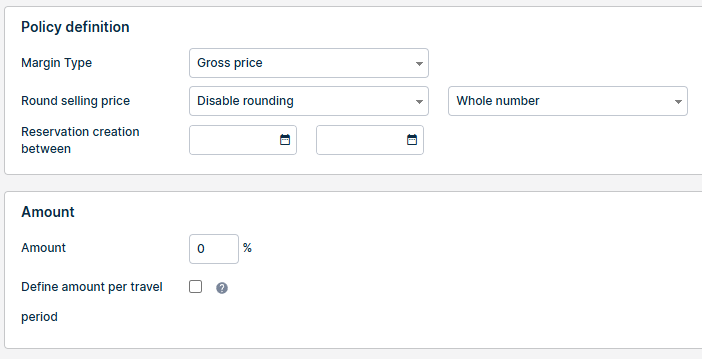
Standard Pricing Policy Configuration (No Travel Periods)
The system continues to support the standard single-margin pricing policy configuration.
- When creating a new pricing policy, the option Define amount per travel period is unchecked by default.
- In this mode, users define the pricing policy in the traditional way:
- One Amount field is displayed
- This amount represents the single margin percentage applied to all travel dates
- Existing pricing policies are automatically migrated into this standard configuration
- Behaviour remains exactly the same as before for all existing clients
Multiple Travel Periods & Margin Definitions
A new checkbox Define amount per travel period enables advanced configuration with any number of travel periods.
Key behaviour:
- Users can add unlimited travel periods via “+”
- Each travel period has its own date range and margin % (Amount)
- Overlapping travel periods are not permitted
- Travel periods are reordered by date after saving and reopening
- Each travel period can be deleted
Amending Existing Pricing Policies
Users may adjust travel periods on existing pricing policies:
- Add new periods (system handles sorting and overlap prevention)
- Modify margins on any travel period
Pricing calculation (no change)
The price calculation logic remains unchanged; only one pricing policy applies per service. The system selects the margin based on the booking’s travel start date and the matching travel period.
Pricing Policy Grid Enhancements
If multiple travel periods exist (more than 5), the grid indicates this with a “>>” marker.
Hovering over the indicator displays a tooltip listing all travel periods and their margin percentages.
Improvement of logging the manual attach/detachment of automatic actions
What’s new
Manual attaching and detaching of Automatic Actions on a Reservation is now consistently logged in the Reservation Activity tab with standardized messages. Adding and removing queued actions is also logged.
Old and inconsistent log messages are removed.
This update is automatically available to you once the release is launched.
Problem being solved
Previously, manual attach/detach actions for Automatic Actions were logged inconsistently: some actions were not logged at all, others were duplicated, and manual attachments were often missing entirely. This made troubleshooting and understanding automation behavior difficult.
Benefit for the users
Users now have full transparency and traceability of all manual and Automatic Action changes on reservations.
How it works
Attach an Automatic Action to the Reservation
When an Automatic Action is manually attached to the Reservation, a message is logged to the Activity tab with the information about the user who did the action.
If, by the manual attachment, an action is added to the queued actions, this is also logged as a separate message.
Detachment of an Automatic Action from the Reservation
When an Automatic Action is manually detached from the Reservation, a message is logged to the Activity tab with the information about the user who did the action.
If, by the manual detachment, an action is removed from the queued actions, this is also logged as a separate message.
