
This month, we are launching exciting product updates in Lemax. Learn about the details below (available from December 4th, 2025).
Copy special offer
What’s new
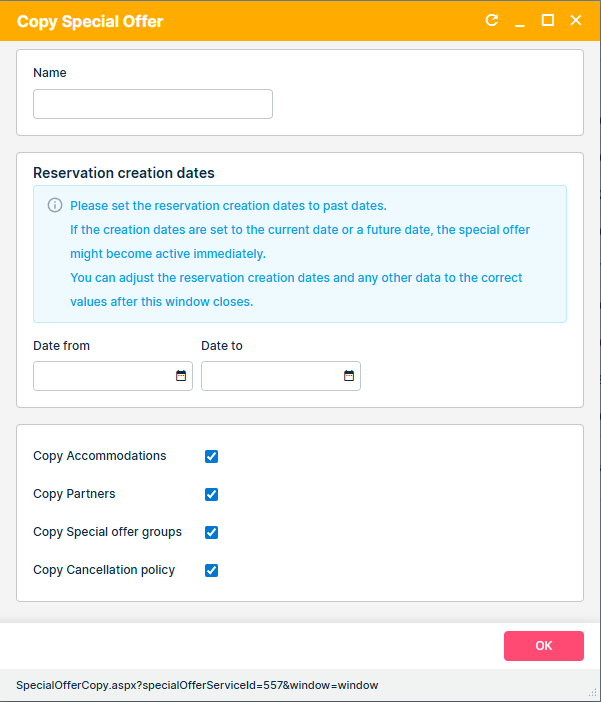
Users can now create a copy of an existing special offer with prepopulated data, reducing manual data entry and ensuring faster setup of new offers. Copy form enables the user to define the Name and the Reservation creation dates in the first step of the copy process.
This update is automatically available to you once the release is launched. Please note that the usage of this update could depend on system setups (which modules/products you use) and user roles.
Problem being solved
Previously, when users needed to create a similar special offer, they had to define a new special offer and all parameters manually. This repetitive process increased the chance of mistakes and wasted time, especially for clients managing multiple active offers.
Benefit for the users
Users can now quickly duplicate a special offer and
- Adjust only the reservation creation dates and name
- Copy data from the source special offer
This improves efficiency, reduces errors, and aligns the process with the standard copy logic already used in Lemax for other entities like reservations.
How it works
Copy special offer form
- On copy, a new form opens where the user can set the Name, Reservation creation date, and which data from the source special offer should be copied:
- Products
- Partners
- Special offer groups
- Cancellation policies
Reservation creation dates
- To disable the special offer from being active immediately, the Reservation creation dates must be set in the past.
- If the Reservation creation dates are set to the current or future date, the special offer might be applicable upon creation.
Prepopulation of data
- After closing the copy form, the new Special offer opens, similar to creating a new special offer, but with prefilled data from the original one (General tab).
- The user can now change the wanted data immediately.
